 Game Overview
You are an air traffic controller at KJFK airport. Your job is to safely guide aircraft to landing, manage departures, and route DCT (direct) aircraft to their destination airports at the map edges.
Visual Guide — How to Play
Follow these visual examples to understand the core gameplay mechanics. Each screenshot shows a key part of air traffic control.
📡 1. Reading Aircraft Information
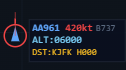
Aircraft data tag — callsign, type, speed, altitude, heading and destination are shown for each aircraft
Each aircraft on the radar shows its callsign, speed, aircraft type, altitude, destination and heading. In this example, AA961 is a 737 flying 420 knots at 6,000ft heading north (H000). Its destination is KJFK, so it needs to land at the airport on the map. Use L / R keys or numpad 4 / 6 to turn the aircraft. Use + / − to change altitude.
🎯 2. Waypoints & Destinations

A destination exit — guide aircraft here to route them off the map
Waypoints and destination exits are shown on the map edges. Aircraft that need to leave the map (departures and DCT traffic) must be routed to the correct exit. Aircraft must be at 5,000ft or higher to successfully exit the map. If they leave below 5,000ft, you'll receive a penalty!
📋 3. Flight Strips
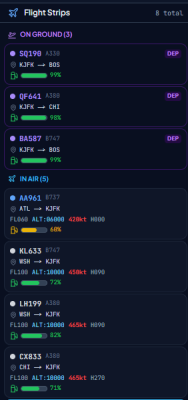
Flight strips — your overview of all aircraft with callsign, type, route, altitude, speed and fuel
The flight strip panel shows all aircraft you need to manage. They are split into ON GROUND (departures waiting at gates) and IN AIR (arriving/DCT traffic). Each strip shows the callsign, aircraft type, route, altitude, speed, heading, and a fuel bar. Click a flight strip to select that aircraft on the radar.
🔄 4. Holding Pattern
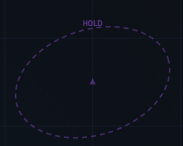
Holding pattern — an aircraft orbiting in a racetrack while waiting to land
When traffic is busy, you can command aircraft to HOLD. They will fly in an oval racetrack pattern until you give them a new command. This is useful when you need to create spacing between aircraft. Watch the altitudes carefully — aircraft in holding patterns can crash into each other if they are at the same altitude!
🛬 5. Landing Approach
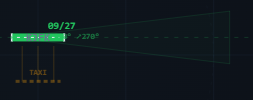
The airport with ILS approach cones — guide aircraft into the triangular zones at the runway ends
To land an aircraft, guide it into the ILS approach cone (the triangular funnel at the end of a runway). The aircraft needs to be at approximately 1,000ft altitude and flying toward the runway. When it's in position, the Land button will light up — press it or use numpad 0 to clear for landing.
🛫 6. Departures
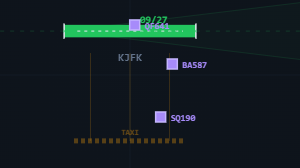
Departures and taxi — select departing aircraft, taxi to runway, then takeoff
Departing aircraft are shown in purple. First, select the aircraft and press Taxi (or numpad /) to send it to the runway. This takes some time. Once it reaches the runway, press Takeoff(or numpad *) to launch. After takeoff, raise its altitude to 5,000ft+ and route it to the correct destination. Aircraft leaving below 5,000ft will earn a penalty!
🎮 7. Command Buttons

The command bar at the bottom of the game — all controls at your fingertips
All aircraft commands are available as buttons at the bottom of the screen. You can also use keyboard shortcuts or the numpad. Each button shows a small key hint badge in the corner. Select an aircraft first, then click or press the desired command.
🧭 8. Destination Selection
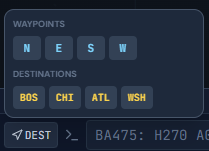
Press DEST to pick a waypoint or destination exit for the aircraft
Press the DEST button to open the destination menu. You can select a waypoint (N, E, S, W — compass directions) or a destination airport (e.g. BOS, CHI, ATL, WSH) to route the aircraft directly there. On numpad, press 7 to enter destination mode, then N/E/S/W for waypoints or 1-9 for destinations.
🚨 9. Events & Emergencies
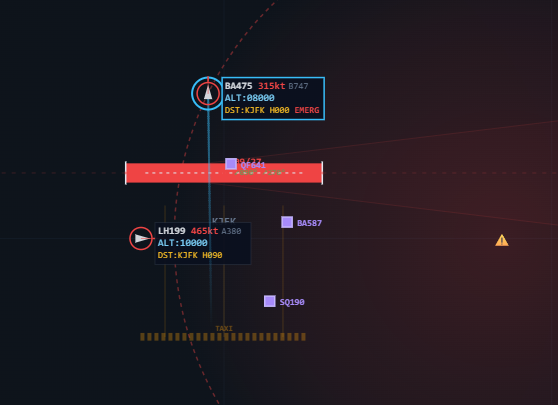
An emergency event — a runway closure after a crash turns the runway red
Many events can happen during a game. If an aircraft crashes or a collision occurs, the runway can be temporarily closed (shown in red). Aircraft with the EMERG tag have declared an emergency and need priority handling. Fuel emergencies, engine failures, and priority timeouts all affect your score — keep a close eye on all aircraft!
Aircraft Types
Fly from map edges toward KJFK. Guide them to an ILS approach cone, then clear for landing.
Wait at gate. Taxi → select runway → takeoff → climb to 5000ft+ → route to destination.
Pass through airspace from one edge to another. Route them to their destination with correct heading.
Urgent military departures. Must taxi, takeoff, and reach destination within 10 minutes for a bonus.
Landing an Aircraft
- Guide the aircraft toward a runway by adjusting its heading (H command or L/R buttons).
- Fly the aircraft into the ILS approach cone (triangular zones at runway ends on the radar).
- When inside the cone, the Land button lights up green. Press it or type
L. - The aircraft will automatically navigate to the runway and descend smoothly.
- If you need to abort, press Cancel to send the aircraft on a go-around to 2000ft.
Departures & Taxi
- Select a departing (purple) aircraft at the gate.
- Press Taxi — if multiple runways are available, choose which runway to taxi to.
- Wait for the aircraft to reach the runway (status shows "Ready for Takeoff").
- Press T/O (takeoff) — aircraft climbs to 1000ft.
- Raise altitude to 5000ft+ with
+1kbutton orA050command. - Use DEST button to navigate toward the destination airport.
Navigation & Commands
| Command | Input | Description |
|---|---|---|
| Heading | H090, H270 | Turn to heading |
| Altitude | A050, A100 | Set altitude (×100ft) |
| Land | L | Clear to land (must be in ILS cone) |
| DCT | D | Direct to destination |
| Taxi | X | Taxi to runway |
| Takeoff | T | Clear for takeoff |
| Hold | HOLD | Enter/exit holding pattern |
| L / R keys | L, R | Turn left/right 30° |
Priority Aircraft
MIL, VIP, and MED aircraft always land at KJFK — they never DCT. Each has timeout limits.
Emergencies
Scoring
| Action | Points |
|---|---|
| Successful landing | +100 |
| Departure reaches destination | +85 |
| DCT reaches destination | +65 |
| Fast handling (<60s) | +35 |
| MIL interception bonus | +200 |
| Emergency landing bonus | +50 |
| Precision landing bonus | +25 |
| Crash / collision | -250 |
| Priority timeout | -150 |
Game Modes
Practice without time pressure. Perfect for learning.
Score as high as possible in 60/120/180 minutes.
Reach 5,000 / 10,000 / 25,000 points as fast as possible.
No collisions allowed. One crash and it's game over.
Difficulty Levels
| Level | Runways | Max Aircraft | Destinations | Go-Around |
|---|---|---|---|---|
| Easy | 1 | 10 | 4 | 0% |
| Medium | 2 | 20 | 6 | 8% |
| Hard | 3 | 30 | 8 | 12% |
| Expert | 4 | 40 | 10 | 18% |
Advanced Mechanics
📋 Contracts
Contracts are optional challenges that appear every 8–15 minutes during Freeplay, Timed and Survival modes. Accept a contract to earn bonus points — or decline and wait for the next one.
Contract Types
Handle incoming military aircraft under time pressure.
Process extra cargo planes flying at 235kt — no time limit.
Survive with only 1 runway open for 10 minutes. Not available on Easy.
Handle extreme mixed traffic (arrivals + departures) above normal limits.
Clear rapid departures one after another.
Flood of civilian aircraft heading to KJFK.
Launch 10 grounded planes within 8 minutes. Only offered when 10+ planes are on the ground.
All runways closed for 5 minutes — keep planes circling safely! 1250 pts. Not available on Easy.